Message edit
Edit a user message or an assistant reply, regenerate the last reply, or retry any turn. Each change opens a new session version.
@agent-stash/dsh-message-edit is a DeepSeek Harness plugin. Each change opens a new session version from the point before that turn. The original version stays as it is, and you can switch back at any time. The same build supports DSH 0.1.0-rc.3 and DSH Desktop 0.2.1-rc.3. It is based on Moeblack/dsh-message-edit 0.2.3.
Usage
- Timeline view: the view tabs below the session title get a Timeline tab. The left side lists the editable messages, thoughts and replies by turn, and you can retry every turn. The right side is the version tree; click a version to switch to it. In the toolbar, choose whether the later turns are dropped or replayed with their original input when you change an earlier turn.
- Title bar: switch between the previous and the next version, or regenerate the last reply.
- Message actions: each finished assistant message has Edit and Retry buttons below it. Edit changes the user message of that turn, or the thoughts or reply of that message.
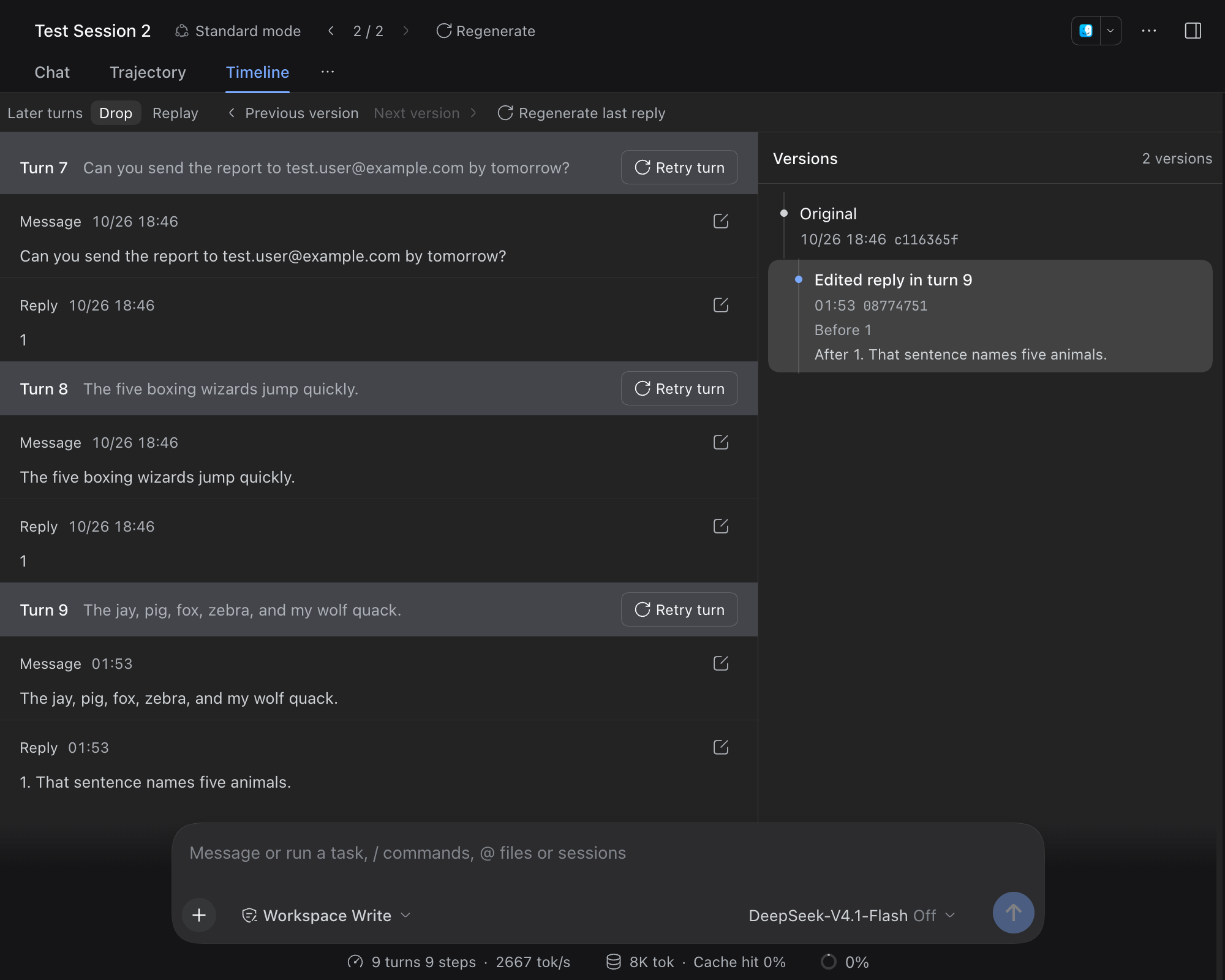
Changing a user message or retrying makes the model generate the turn again. Changing only the assistant's thoughts or reply does not call the model; the new version uses the edited text as it is.
Data
- A new version is an ordinary DSH child session whose parent is the version you changed. The session log contains only built-in DSH events. After you uninstall the plugin, all versions still open as usual.
- The operation that produced each version (which block was edited, and the text before and after) is stored in the DSH storage domain
message_edit. The timeline reads it to show version notes and the undo chain.
Install
Add the index source as described in Import the Agent Stash plugin market, then install @agent-stash/dsh-message-edit from the Discover page.
The plugin source and its interface rules are in packages/dsh-message-edit/ in the repository.
