dsh-stash-kit
The panel, ghost text, motion and appearance settings that the Agent Stash DSH plugins share. You change them on one settings page.
The browser half of the Agent Stash Kit (dsh-stash-kit) provides the stashKit service. dsh-recall and dsh-autosuggest use it to render the panel and the gray text. The Host half holds the appearance settings. When you change them once, the change applies to all plugins at the same time.
The panel uses the same geometry as the built-in DSH / menu. It sits 4px from the input box and has the same corner radius and padding. The left edge of its content lines up with the text column of the input box. The panel background is fully opaque. By default a backdrop blur is added on top.
Settings
On the Plugins page, open Agent Stash Kit and click its entry to go to the settings page.
Change the settings listed below. The preview at the top of the page follows them.
Click Save. The changes take effect at once.
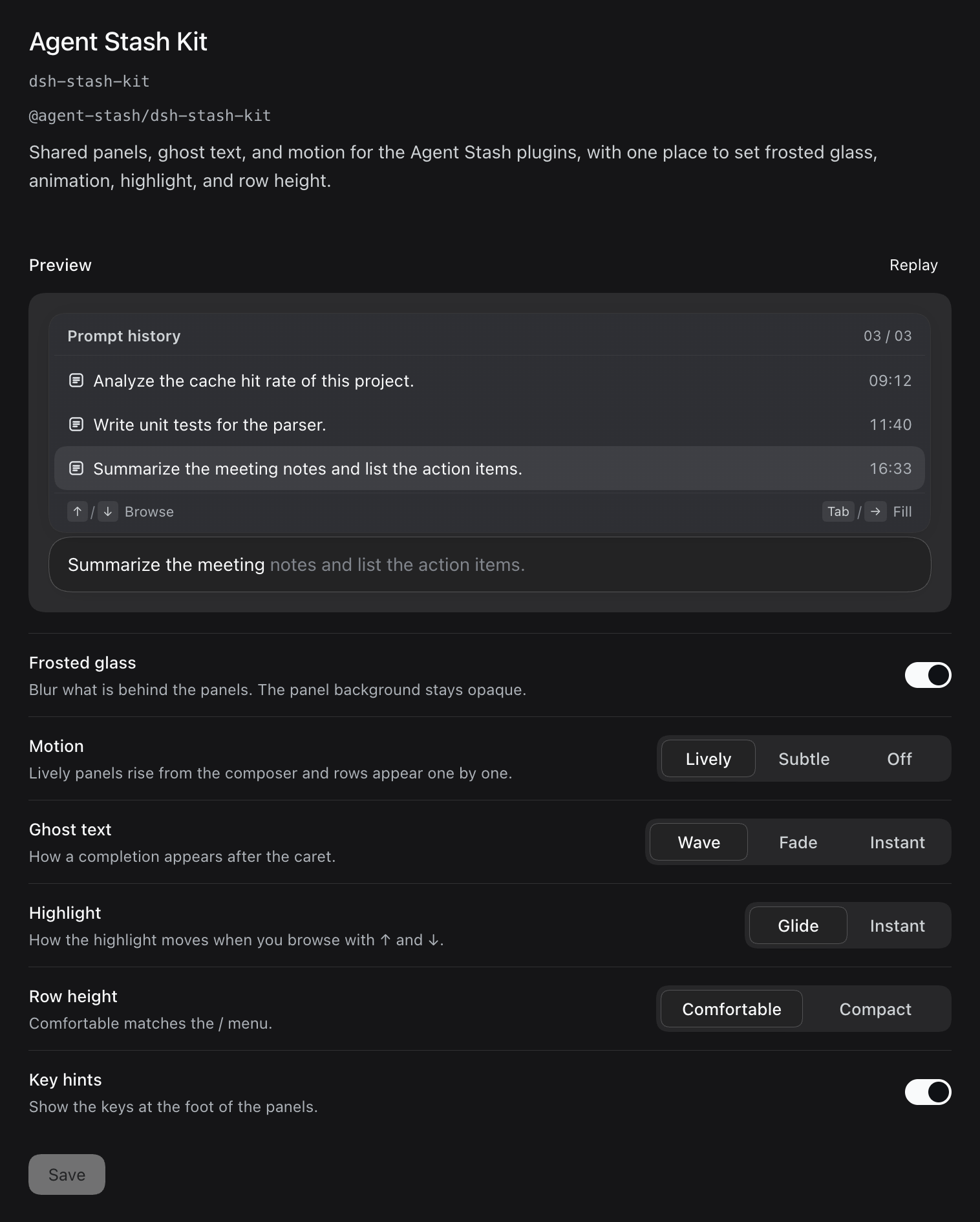
| Setting | Field | Values | Default |
|---|---|---|---|
| Frosted glass | glass | On (opaque, with backdrop blur) / Off (opaque) | On |
| Motion | motion | lively Lively, subtle Subtle, off Off | Lively |
| Ghost text | ghost | wave Wave, fade Fade, none Instant | Wave |
| Highlight | highlight | glide Glide, instant Instant | Glide |
| Row height | density | comfortable Comfortable (34px), compact Compact (28px) | Comfortable |
| Key hints | hints | On / Off | On |
Motion
- Lively: the panel rises from the direction of the input box and goes from blurred to sharp. The rows appear one by one, starting with the row next to the input box. On close, the panel fades out downward. When you go back with ↑, the new draft slides into the input box from the direction you browse in.
- Subtle: the panel only fades in and out briefly. Draft switches play no animation.
- Off: the panel and the gray text appear and disappear at once.
- For Ghost text, Wave reveals the rest of the text with a fading mask that sweeps from left to right. Fade fades in the rest of the text as a whole.
- When the system Reduce motion setting is on, the panel keeps only its fades. The row stagger, the highlight glide and the draft-switch animation are removed, and ghost text appears at once.
Configure in a profile
You can also set the values in the profile patch:
- id: dsh-stash-kit
  name: "@agent-stash/dsh-stash-kit"
  config:
    glass: false
    motion: subtle
Install separately
Add the index source as described in Import the Agent Stash plugin market, then install @agent-stash/dsh-stash-kit from the Discover page.
Disabling the kit
After you disable the kit, the plugins that depend on it stop at Waiting for dependencies. When you enable those plugins again, the kit is enabled again.
