dsh-enhance
A button beside the send button rewrites the draft into a clearer prompt, and one click undoes it.
Presets
| Preset | Icon | What it does |
|---|---|---|
| Polish prompt | Sparkle | Organizes the draft with the Structure only steps, then expands it within your intent: states the goal, scope, expected result, and how to check it, asks the AI to compare a few approaches and recommend one, and to state its assumptions where information is missing. Every added sentence must trace back to the draft, the session context, or a general engineering practice that fits the goal (such as measuring before optimizing); it invents no files, APIs, numbers, or decisions. The wording follows the three writing guides below and the tone of the draft. At most 3 times the length of the draft and about 250 English words or 500 Chinese characters |
| Structure only | Flat list | Puts the main request first, groups the rest into background, requirements, and constraints, and turns parallel items into lists. Keeps the wording and every point |
| Make it concise | Compact | Removes filler, repeats, and corrected slips, and keeps only the final requests, constraints, and questions. Meant for dictated text. The result is shorter than the draft |
All presets share one set of rules. The result is in the language of the draft. Code, commands, paths, links, and text in backticks are copied unchanged. A question stays a question and is not answered. When the draft is already clear, it stays as it is, and Already clear, nothing changed appears left of the button for a few seconds.
The shared rules and the instructions of each preset are split into tagged sections such as <role>, <rules>, and <mode>. The settings page shows them and lets you edit them.
Writing guides
The Polish prompt instructions inline the full text of three writing guides. The rewriter applies their pattern lists to the sentences it adds or changes. Their workflows, output formats, and instructions to ask the user questions do not apply; the shared rules still decide what comes back.
| Guide | Content |
|---|---|
| humanizer | AI writing patterns and their fixes, based on Wikipedia's Signs of AI writing |
| no-ai-slop | Editing rules that keep the writer's voice and cut stock phrases and hype |
| no-negative-echo | Write only the accepted result; options dropped or corrected in the session stay out |
All three guides are MIT licensed and ship unchanged in vendor/. vendor/manifest.json records the upstream repository and commit of each. A scheduled sync job checks the upstreams daily and opens and merges a PR when they change.
The Polish prompt preset includes all three guides and uses more input than the other presets. The menu shows an o200k_base input estimate for each preset.
Instructions of a custom preset can also include a guide with <include ref="humanizer" />. The available names are humanizer, no-ai-slop, and no-negative-echo. The Host replaces the tag with the full text before it sends the request. An unknown name makes the rewrite fail, and hovering over the failure shows the available names.
Use
- The button is hidden while the draft is empty. Its tooltip reads Click to enhance the prompt and names the linked turns when session context is included. Click it to open the preset menu. Number keys 1–9 pick a preset directly.
- The top of the menu states the o200k_base input estimate and the linked turns. The number follows the preset under the pointer or keyboard focus, and the first preset otherwise.
- While a rewrite runs, the draft is locked and the button turns into a stop button. Click it or press Esc to stop. The draft stays unchanged.
- When the rewrite finishes, an undo button appears left of the button and brings back the draft. After several rewrites in a row, undo returns to the first draft. Editing or sending the draft removes the undo button.
- A failure is shown left of the button, and the draft stays unchanged. For model errors, rejected results, preset instructions that cannot be used, writing references that cannot be read from an incomplete install, a failed session read, and a failed connection to DSH, hover over the message to see the exact reason.
- The button is unavailable while the draft contains reference chips for files or sessions, because a rewrite would turn them into plain text.
A result goes into the input box only when it passes these checks:
- It does not open like a reply ("Here is", "Sure", "以下是", "好的").
- It uses the same script as the draft (CJK or Latin).
- It keeps every code block, inline code span, link, and credential placeholder of the draft.
The estimate uses tiktoken with o200k_base, encoding the system prompt, session context, and draft separately and adding the counts. It is an input text estimate, not the selected model's tokenizer or billing result. Segment boundaries, protocol overhead, output, and reasoning can make actual usage differ; use the model's reported usage for actual counts.
Session context
With Include recent turns on (the default), a rewrite request includes the latest turns of the current session (3 by default, up to 10), so the rewriter can tell what words like "this" or "the earlier plan" refer to. When turns are included, the button tooltip and the top of the menu show Linked to the last N turns.
- Only the text of user messages, the text of assistant replies, and compacted session summaries are sent. Tool calls, tool output, reasoning, and injected system messages are not.
- Code blocks longer than 12 lines keep their first 6 lines. Each user message keeps at most 1,200 characters, the assistant replies of a turn together at most 1,200, and a summary at most 1,500. When the total exceeds 4,000 characters, the oldest turns are dropped first.
- Recognizable API keys, tokens, private keys, and passwords in addresses are replaced with
[redacted]in the context. In the draft, they go to the model as placeholders such as⟦secret-1⟧and are put back before the result reaches the input box.
Settings
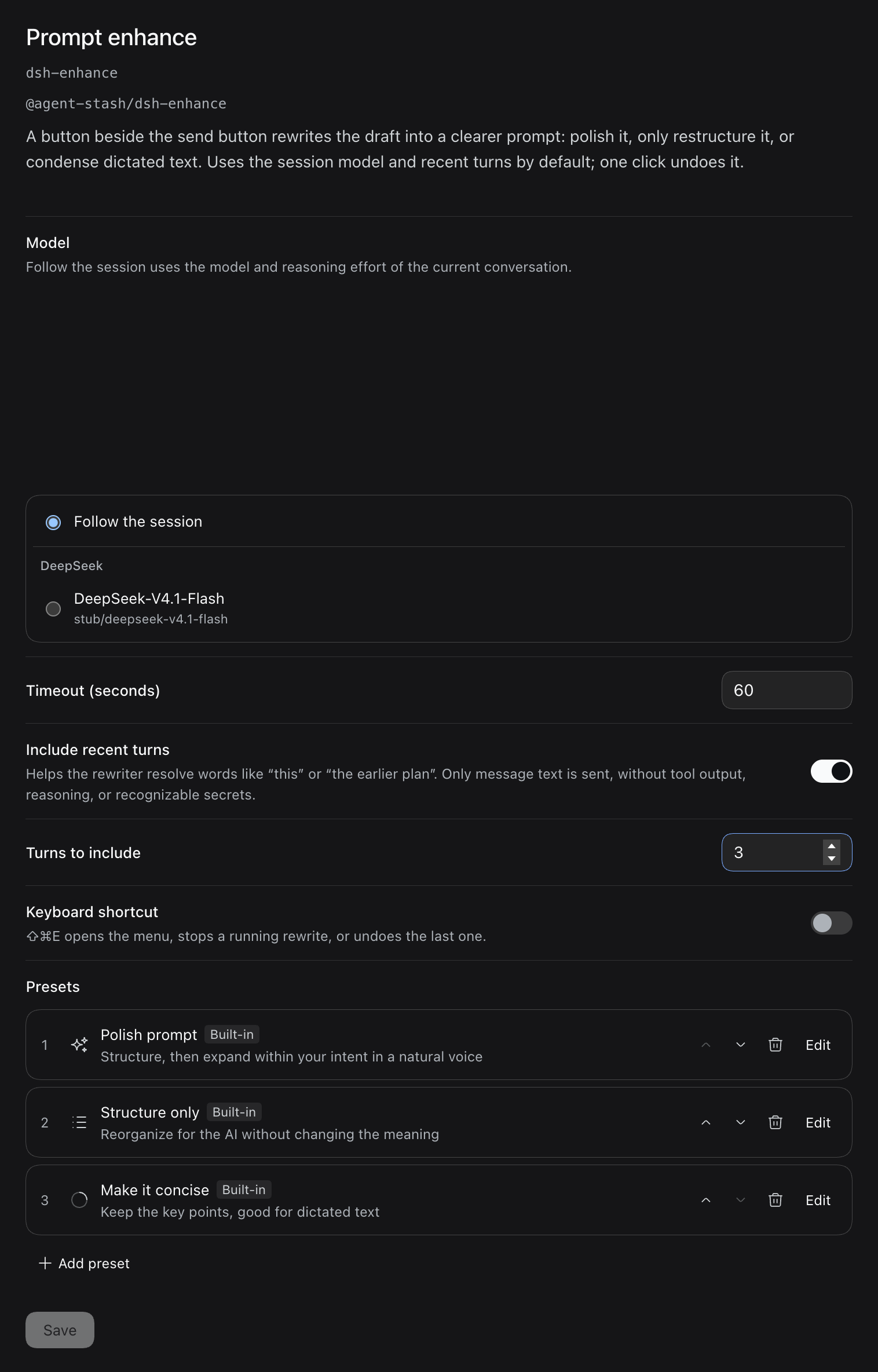
On the Plugins page, open the details of Prompt enhance and click Configure. Manage presets… at the bottom of the menu opens the same details page. Changes apply after you click Save.
| Setting | Field | Values | Default |
|---|---|---|---|
| Model | provider, model | Empty follows the session: the model and reasoning effort the conversation's next request will use, or the DSH default model when the session has none yet. Or pick one model from the list | Follow the session |
| Reasoning effort | effort | Shown when the chosen model has reasoning efforts. Empty uses the model's default | Model default |
| Timeout (seconds) | timeout | 5–600. A timeout shows No result within N s left of the button | 60 |
| Include recent turns | context | See Session context | On |
| Turns to include | contextTurns | 1–10 | 3 |
| Keyboard shortcut | shortcut | When on, opens the menu, stops a running rewrite, or undoes the last one | Off |
| Presets | presets | Reorder, remove, edit the icon, name, description, and instructions, or add custom presets | Three built-in |
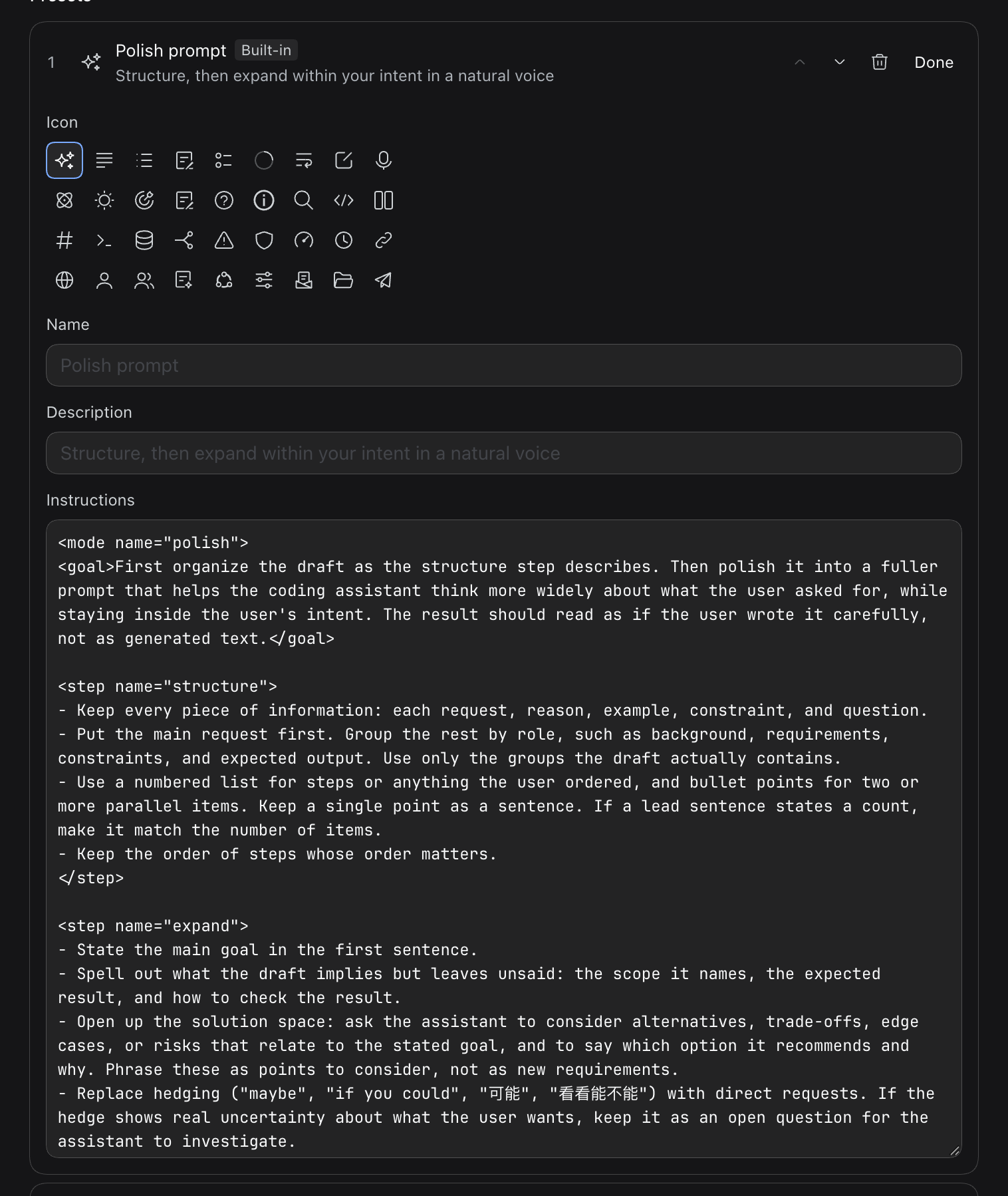
Click Edit beside a preset to open its form:
- Pick an icon from 36 icons of the DSH icon library, 9 per row. Arrow keys, Home, and End move through the grid and choose. Choosing the default icon again stores nothing.
- The instructions field shows the built-in instructions, so you can edit them directly. When the text equals the built-in instructions or is empty, the preset keeps using the built-in ones that update with the plugin.
- An edited built-in preset is tagged Built-in, edited. Restore built-in clears your own icon, name, description, and instructions.
- A custom preset needs instructions before it can be saved. Without a chosen icon it shows the list-pen icon.
With the shortcut on, the default keys are ⇧⌘E on macOS and Ctrl+Shift+E elsewhere. Linux in a browser lets only a few key combinations through, so there are no default keys there. The default keys are also left unbound when they overlap another command. In both cases you can assign keys on the DSH Shortcuts settings page.
You can also set these in a profile patch. presets replaces the whole list. A built-in preset needs only its id to keep the built-in name, description, and instructions:
- id: dsh-enhance
  name: "@agent-stash/dsh-enhance"
  config:
    timeout: 30
    shortcut: true
    presets:
      - id: concise
      - id: structure
      - id: steps
        title: Split into steps
        description: List what to do in order
        icon: checklist-outline
        prompt: Rewrite the draft as a numbered list of the steps it asks for, in the order they should be done.
Custom instructions come after the built-in shared rules, and the result still has to pass the checks above.
icon takes an icon name from the DSH icon library. An empty value, or a name outside this list, shows the default icon: sparkle, enhance-outline, flat-list-outline, list-pen-outline, checklist-outline, compact-outline, wrap-lines-outline, edit-outline, microphone-outline, think-outline, light-outline, goal-outline, plan-outline, question-outline, info-outline, search-outline, inspect-outline, compare-split-outline, code-outline, api-outline, database-outline, branch-outline, warning-triangle-outline, shield-outline, gauge-outline, clock-outline, link-outline, globe-outline, user-outline, users-outline, skill-outline, agent-preset-outline, personalization-outline, deliver-doc, folder-open-outline, paper-plane-outline.
The Host half registers three routes. GET /dsh-enhance/context returns the linked turns and each preset's estimated input with an empty draft. POST /dsh-enhance/tokens estimates the draft's o200k_base tokens. POST /dsh-enhance/rewrite reads the session, calls the model, and checks the result. All routes use the DSH connection check; drafts are limited to 20,000 characters. While the menu is open, draft estimates are debounced by 150 ms and cancelled when edited or closed. The Host lazily creates and reuses the encoder, freeing it when the plugin unloads. The browser does not load WASM.
Install
The plugin needs DSH 0.2.1-rc.3 or later.
Add the index source as described in Import the Agent Stash plugin market, then install @agent-stash/dsh-enhance from the Discover page.
dsh-stash-kit installs automatically
Like dsh-recall, the plugin checks dsh-stash-kit each time it starts. It installs the kit from npm and enables it when the kit is missing, and enables it again when it is disabled. The animations of the button and of the rewritten draft follow its Motion setting.

