Skill Scout
Find workflows that repeated successfully and fixes that were verified in finished sessions, summarize them first, draft a Skill once you approve, and save it after review.
@agent-stash/dsh-skill-scout is a DeepSeek Harness plugin. It reads finished sessions on your machine, judges whether a task succeeded only from tool results, and turns workflows that succeeded in several sessions, and fixes that passed a check after a failure, into leads. A model summarizes each lead into one or more ideas, each saying what it found and which Skill it would create or extend. An idea is drafted only after you approve it, and nothing is saved until you have looked at the evidence and previewed the draft, and you can undo a write as long as the file has not changed since. The plugin needs DSH 0.2.1-rc.3 or later. Its interface is in the DSH web interface and the desktop app.
Usage
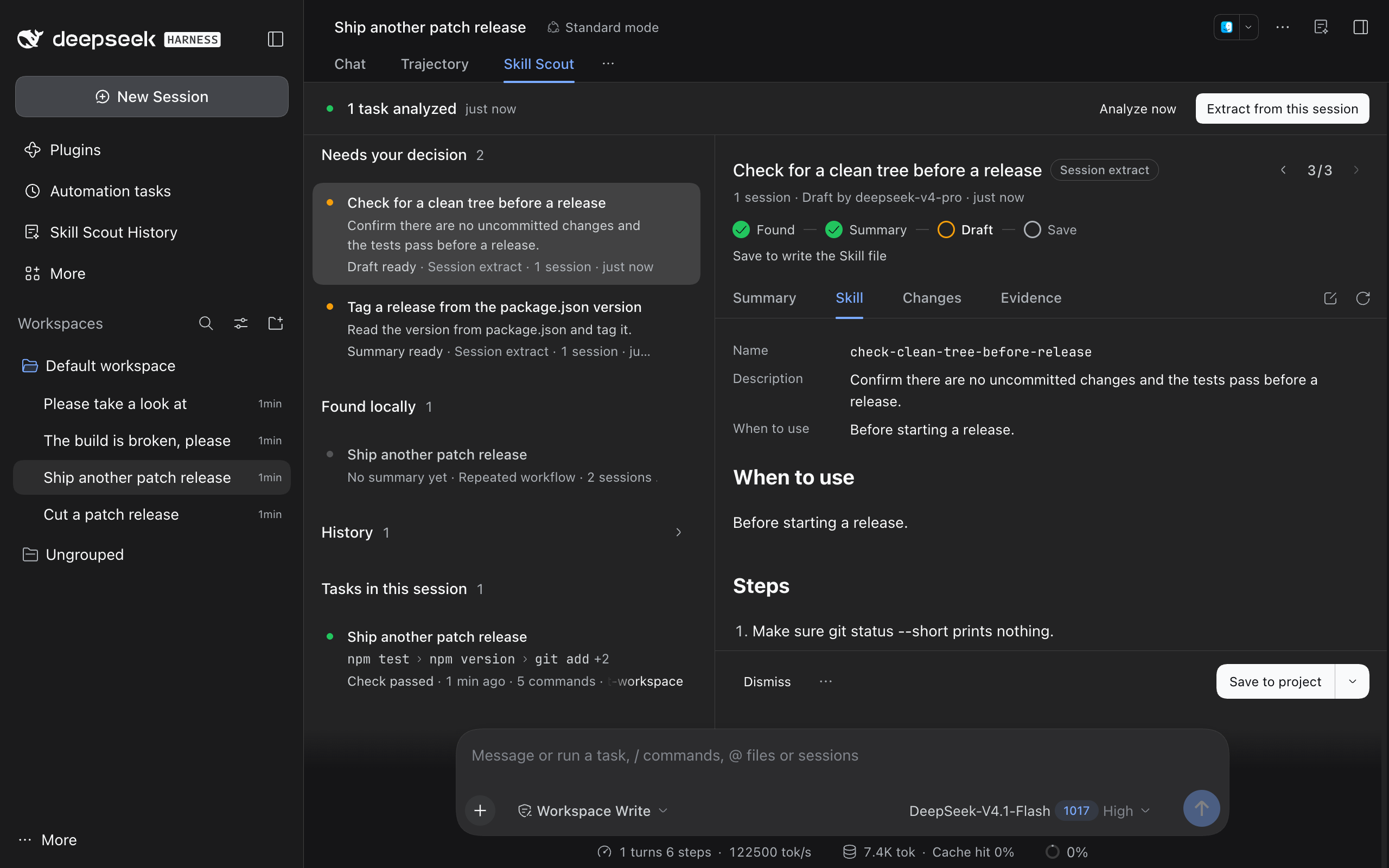
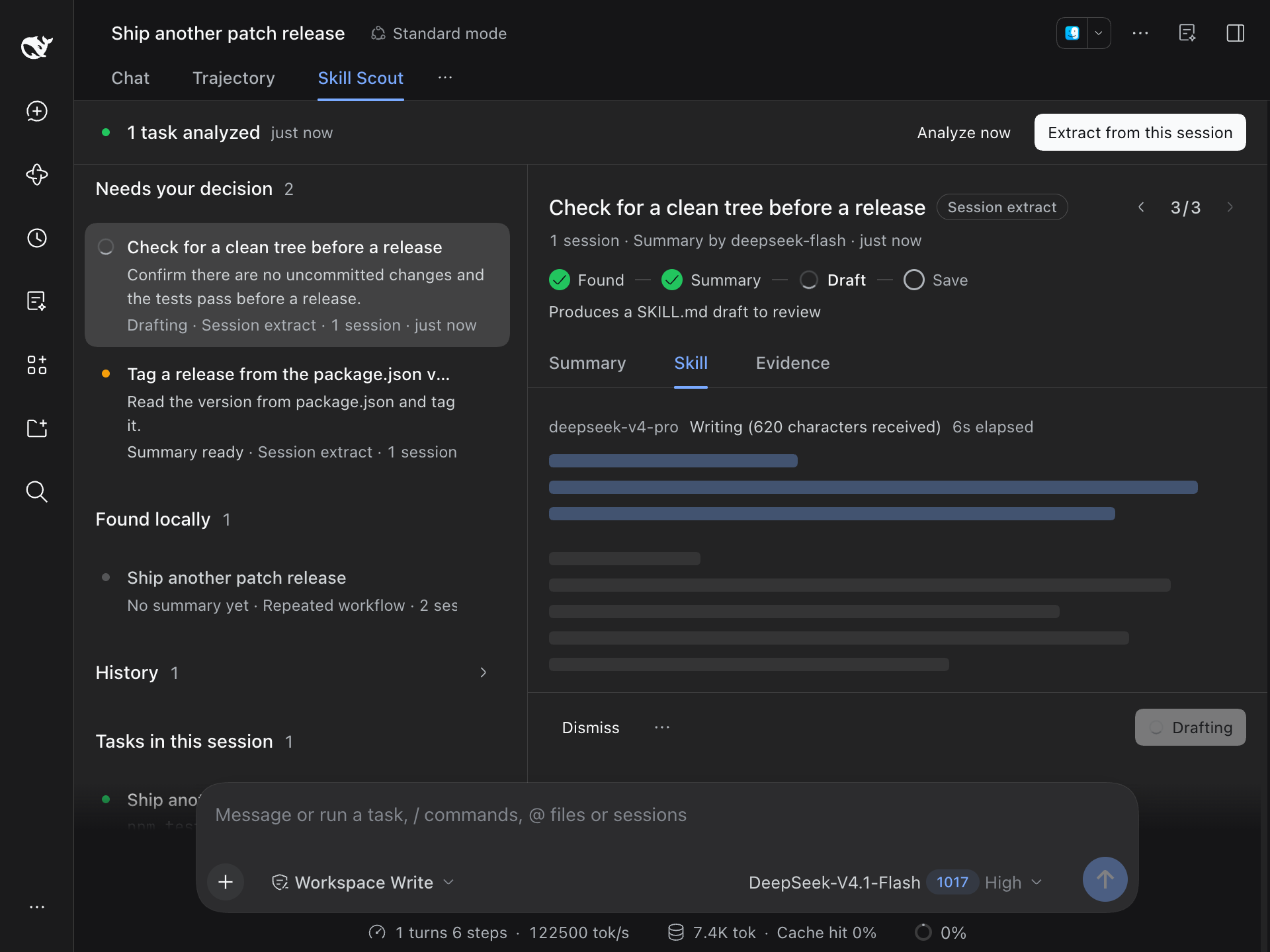
- Session tab: every session has a Skill Scout tab next to the conversation and trajectory. The top shows how far this session has been analyzed; Analyze now skips the quiet period, and Extract from this session sends the whole session to the discovery model, which proposes up to 5 ideas. The left column groups the suggestions that cite this session under Needs your decision, Found locally, and History, with a dot before each row for its state, followed by the session's tasks; the right column shows the selected suggestion. In a narrow view only one column shows, and the detail has a back button.
- Skill Scout History: a page in the sidebar with Suggestions, Search, and Stats sections. Suggestions holds every lead and idea: Needs your decision has ideas waiting for your approval, drafts being written, and drafts ready to save; Found locally has leads without a summary yet; saved, dismissed, and not-worth-saving ones move to History.
- Title bar icon: shows a count when new summaries or drafts arrive, and the count clears when you open its popover. Clicking a card in the popover opens Skill Scout History with that card selected. Without new suggestions it is only an icon, and the plugin shows no notifications. Set Header badge to Icon only to hide the count.
- Several ideas: one lead's summary can propose several ideas that do not overlap, up to 3 for leads the rules found. Each idea gets its own card, and the ‹ n/m › control at the top right of the detail steps through the ideas from the same summary; clicking n/m lists them all. When different leads propose an unfinished idea with the same name, only one card shows, noting how many more share the name.
- Steps: under the detail title, a row of steps (Found, Summary, Draft, Save) marks where the item is, and the line below it says what comes next and which model it goes to.
- Summary: before a summary exists, the Summary tab lists the steps the rules matched, and Summarize asks the discovery model for one. Afterwards it lists the idea's plan: what was found, what the Skill is for, when to use it, the Skill to create or add to with an outline of its steps, the risks, and how to verify it.
- Drafting: Draft Skill approves the idea, and the drafting model writes the Skill from its plan.
- Progress: a request shows the stage it is in: queued, preparing the evidence, waiting for the model, thinking, writing (with the characters received so far), and checking against the evidence, along with the time elapsed. Placeholder bars light up one by one as text arrives; they stay still when the system asks for reduced motion. The result stays where the request started. A notice with a View button appears only when no open session tab, Suggestions section, or popover lists that card.
- Other detail tabs: Skill is the draft, which you can edit, and Draft again at the right end of the tab bar writes it once more from the same plan. Changes shows the target path and the file diff. Evidence lists each source task's request, commands, exit codes, and one error line per failure, and Open session goes back to the session.
- Save: Save to project writes the project's
.agents/skills/<name>/SKILL.md; the arrow next to it switches to~/.agents/skillsfor your user. When the plan finds that an existing Skill covers the task, only a section is appended to the end of that file. - Undo, dismiss, and restore: you can undo a save. Dismiss moves a card to History, and Dismiss similar under More actions also stops close variants from coming back: later ideas with the same name or a similar title are dismissed as they arrive. Dismissed cards can be restored.
Search and stats
-
Search: looks through the plugin's redacted task records for user requests, commands, error lines, edited file paths, and messages sent while a task ran. A task matches when it contains every word, and you can filter by outcome. Full tool output and the agent's reply text are not stored, so they cannot be found. Select 1 to 12 tasks and click Extract selected to send them to the discovery model, which proposes up to 5 ideas.
-
Backfill: only sessions inside the history range (30 days by default) are analyzed. Read past 90 days and Read all sessions read earlier sessions one by one in the background, show the total, the sessions read, and the failures, and can be paused and resumed. Backfilled sessions can be searched and extracted from, and the rules do not run on them.
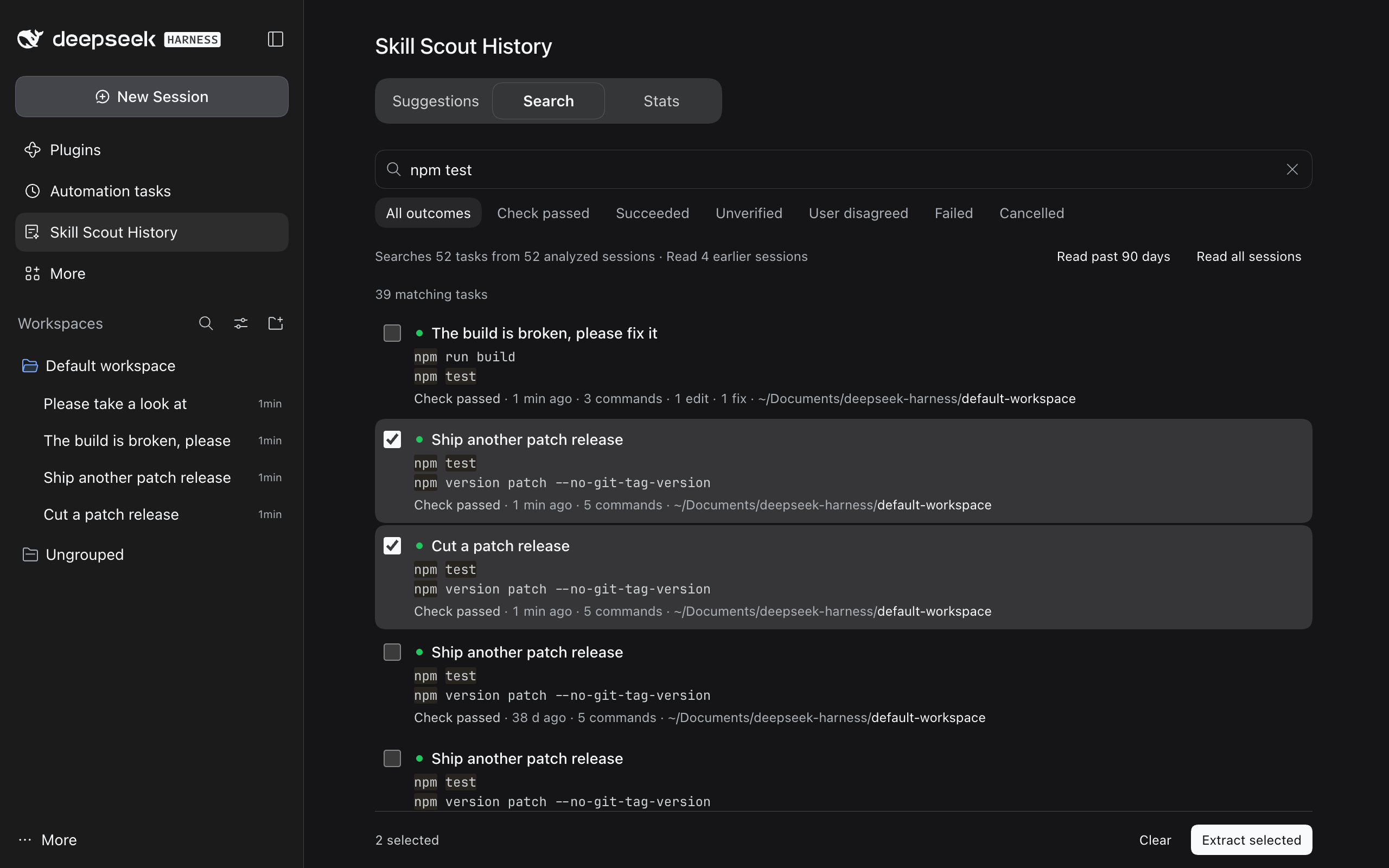
Search analyzed and backfilled tasks, and select a few for the discovery model to extract from -
Performance: search queries an in-memory index and never reads raw session logs. On a machine with 829 session logs (585 MB compressed), the 719 tasks extracted from 304 sessions index in about 25 ms, and a query takes at most 0.1 ms; decompressing and reading every log takes about 15 seconds.
-
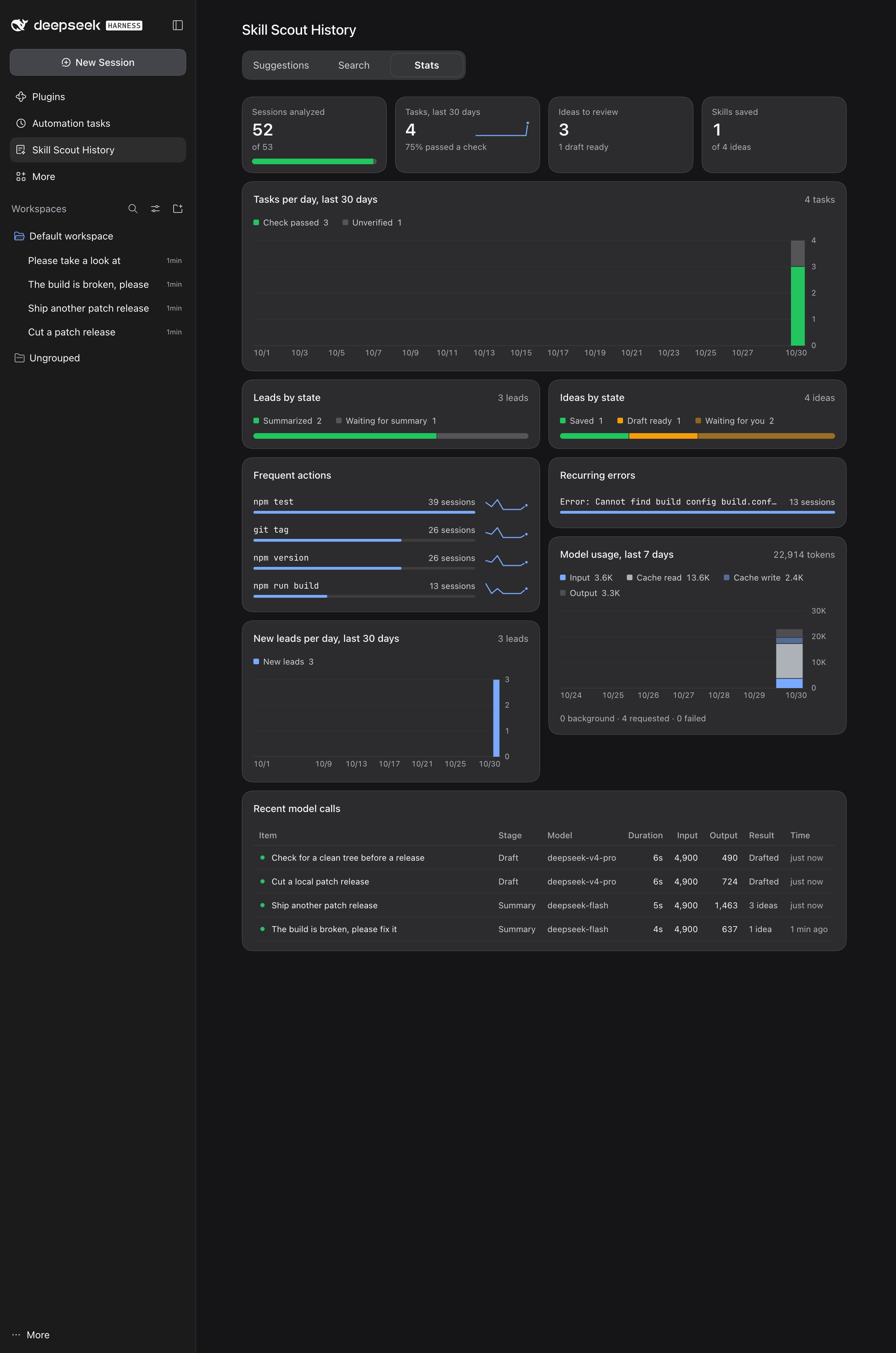
Stats: four totals at the top: sessions analyzed, tasks in the last 30 days, ideas to review, and Skills saved. Below them come daily tasks for the last 30 days stacked by outcome, lead and idea states as shares, actions and errors that recur across sessions (actions with an 8-week trend; click one to search for it), new leads per day, sessions that failed analysis, model usage over the last 7 days (input tokens split into uncached, cache reads, and cache writes), and a table of recent model calls (click a row to open its card). The charts can be read with the keyboard, and a legend item hides its series.
Rules
- Success comes only from tool results: after the last edit, the last run of every command succeeded. The agent saying it is done does not count, and neither does a task the user says is wrong in the next message.
- Commands are compared by action, so different spellings of one action count as one step:
pnpm build,npm run build, andyarn build;npx vitestandpnpm exec vitest;python -m pytestandpytest;bash scripts/release.shand./scripts/release.sh;git checkout -bandgit switch -c;turbo run buildandpnpm build;npx tsx scripts/seed.tsandtsx scripts/seed.ts. Different actions such aspnpm buildandpnpm test,git pushandgit pull, ornpm publishandnpm versionstay apart. Inline code (python -c,node -e), HTTP requests (curl,wget), remote logins (ssh), andopendo not show what was done, so they carry as little weight as commits and pushes. Multi-line scripts are split into commands; here-document bodies, shell keywords such asforandif, and builtins such assetandexportare not steps. Command and file-editing tools from other agents and MCP servers are classified by name. - A repeated workflow must appear in at least 2 independent sessions (configurable), with similar steps that all succeeded. Steps that nearly every task has, such as commits, pushes, and dependency installs, carry little weight, so two tasks must share at least one other step. Scripts with the same prefix, such as
buildandbuild:web, count as partly the same, and the shared steps must run in roughly the same order. When the two requests are worded differently (for example one in Chinese and one in English), they must share at least two distinctive steps. History inherited by a fork counts once, and retries inside one session do not count as repeats. - A recovery needs the whole chain: a command fails, then dependencies are installed, configuration changes, or the rerun changes its options or environment variables (
pnpm test --runInBand), and then the same action succeeds, possibly spelled differently (npm testfails,pnpm testpasses). Changing only files, arguments, or option values is not a fix, and neither is trying another inline snippet or another URL. A fix that only edits application code is suggested only when the same error shows up in several sessions; errors are compared after paths, version numbers, and platform names (darwin-arm64,linux-x64-gnu) become placeholders. - A single long task that passed a check and used at least 5 distinct non-routine commands (not counting inline code and HTTP requests) from 3 or more command families also goes to the summary as a candidate, labeled Long verified task.
- The summary sees the most related existing Skill and can call the candidate a duplicate or propose an addition. After a summary says a candidate is not worth saving, it is summarized again only when the evidence doubles.
Summaries and drafts
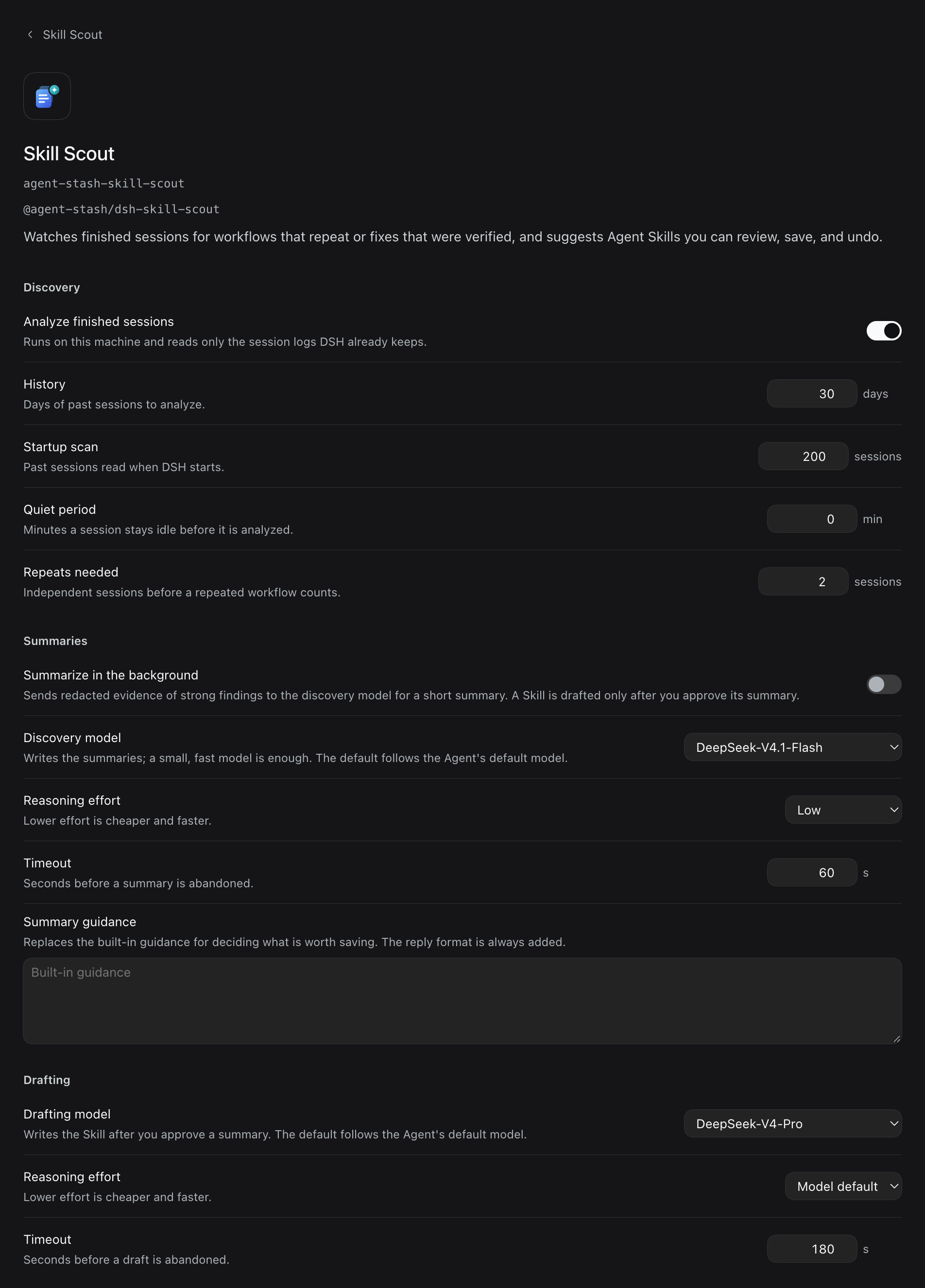
A model takes part in two steps, each with its own model setting. Without a chosen model, each step uses the agent's default model.
- The discovery model writes the summary: whether the lead is worth saving and, if so, one or more ideas, each with a title, what was found, what the Skill is for, when to use it, a Skill name, an outline of up to 8 steps, up to 3 risks, and how to verify it. Skill names within one summary differ. It checks your corrections, the causes of failed commands, and the steps tool results verified before deciding. Background summaries are off by default and only cover leads the rules found; with them off, you can still click Summarize in a lead's detail. With them on, background summaries are limited by a daily count, a minimum interval, and a timeout. Summaries you request, Extract from this session, and Extract selected do not count toward the daily limit.
- The drafting model writes the draft only after you click Draft Skill. It writes only the Skill the idea names, follows the plan's trigger, outline, and verification, turns the plan's risks into prerequisites or limits, and turns your corrections during the task and the causes of failed commands into prerequisites, pitfalls, or limits. Drafts are never written in the background, and a failed draft is not retried automatically. A lead can be summarized again only while none of its ideas has a draft or a save, and the new summary replaces all of its ideas.
The model receives redacted evidence: user requests, the working directory, command lines, paths of edited files, exit codes, one error line per failure (when Include error lines is on), the start of the agent's last reply, messages the user sent while the task ran (the last 3), the user's next message, the steps the rules matched, and the names and descriptions of up to 3 related existing Skills, with an excerpt of the most related SKILL.md. A summary request also carries the names of all Skills the evidence session can see (up to 200), which a new Skill cannot use. Full tool output, workspace file contents, and the agent's reasoning are not sent. When the evidence exceeds the character limit, the agent reply and the Skill excerpt are dropped first. A draft request also carries the plan of the idea you approved, and an addition to an existing Skill carries that Skill's full text. When the evidence session can see a Skill named skill-creator, a draft request also carries its SKILL.md (redacted, first 20,000 characters) as guidance for writing Skills; summary requests do not. Requests have no tools and run outside any session. Each answer must match the expected structure, and every cited piece of evidence must exist. A summary cannot propose a new Skill whose name is taken or repeated within the summary, or an addition to a Skill that does not exist. Every command in a draft step, including each part of a command chain, must be the same action as a run that the step cites, and that action must have succeeded somewhere in the evidence. A summary or draft that contains a credential, signs of prompt injection, a download piped into a shell, or a delete of the root or home directory is rejected. Commands such as sudo, force pushes, and recursive deletes are shown as cautions on the Skill tab.
Data
- Session text is redacted on your machine before it is stored, sent, or shown: common API keys, tokens, private keys, auth headers, password assignments, credentials in URLs, and email addresses become placeholders, and home directories on macOS and Linux (
/Users/<name>,/home/<name>) become~. You can add regular expressions in the settings. - The plugin stores only episode records, leads (with their summaries and each idea's draft and write record), model usage for the last 8 days, and the last 100 model calls, in the DSH storage domain
skill_scout. Records of sessions past the history range are deleted unless a pending lead cites them or a backfill read them. A session that fails analysis is recorded with the reason and retried only after its log grows. - The plugin does no analysis while the agent runs. It reads a session after a turn ends and the session stays idle for a while (2 minutes by default).
- When several DSH instances share one DSH home directory, only one of them analyzes sessions and writes background summaries.
- Writes happen only after you click Save, and only to
<name>/SKILL.mdunder a project or user Skill directory. A new Skill is not written when a file already exists at the path. Adding to an existing Skill only appends a section to the end of the file, and nothing is written if the file changed after the preview.
Install
Add the index source as described in Import the Agent Stash plugin market, then install @agent-stash/dsh-skill-scout from the Discover page.
The plugin source, its design decisions, and how it is tested are in packages/dsh-skill-scout/ in the repository.
